I’m going to go out on a limb and say if you’ve been in the travel hacking community since before 2020, you know exactly what United’s Expert Mode is, and if you’re newer, there’s about a 0.20 probability that you have any idea. Feel free to tell me how wrong I am. Anyhoodles, there are a few good reasons to know about Expert Mode:
- When your flight’s been cancelled, rebooking is a zero sum game with your fellow passengers; the number of free seats on later flights is finite and more aren’t going to magically appear, instead they’re going to vanish rapidly as customers rebook. Knowing which flights have which seats lets you make the best rebooking decision.
- When your flight might be oversold and you want to be flexible for a travel voucher, knowing what the seat count on your flight looks like is immediately actionable. I guess it also applies if you want to be hauled off of a plane and punched if it’s oversold. Too soon?
- If you want to know your chances of a Same Day Change to a better flight, knowing availability in the fare bucket you’re ticketed in will help you understand your odds and make backup plans.
With that out of the way, let’s briefly discuss fare buckets.
Fare Buckets
In the time before computers, airlines used repurposed slop buckets to hold each paper ticket they would sell. When you’d buy a ticket by telegraph, they’d send it from the bucket to your house via courier pigeon (*citation needed). The pigeons are gone, but buckets remain. So, what’s a modern fare bucket? Let’s talk to the ghost of MEAB past discussing bucket jumping:
WTF is a fare bucket? The boring definition is that each bucket is a letter (like S, or J) or pair of letters (like OW) that corresponds with a given fare on file in [airline] systems. There isn’t a standard for buckets on all airlines, but they do share a lot in common. First class fare buckets are often Z or F, and economy buckets are often S, L, Y, and B for example. Typically there are around 20 fare buckets per airline.
Fare buckets also have a hierarchy. F > Z, and Y > B > M. See the pattern? Nah, me neither. That’s ok though. You don’t need to memorize the hierarchy, just know that it exists and how to find it.
I promise this is going to become important shortly so stick with it. On United, you’ve got three types of revenue fare buckets:
- First and Business: J, C, D, Z, P
- Premium Economy: O, A, R
- Economy: Y, B, M, E, U, H, Q, V, W, S, T, L, K, G, N
Yeah yeah, there are quasi-buckets too like RN and PN, but let’s chill for a second ok? They don’t matter for this conversation. Just have the above table handy when it’s game theory time.
Expert Mode
United’s Expert Mode shows you which fare buckets are available when you search for flights using united.com. After enabling expert mode and clicking “Details”, you’ll see something like this:
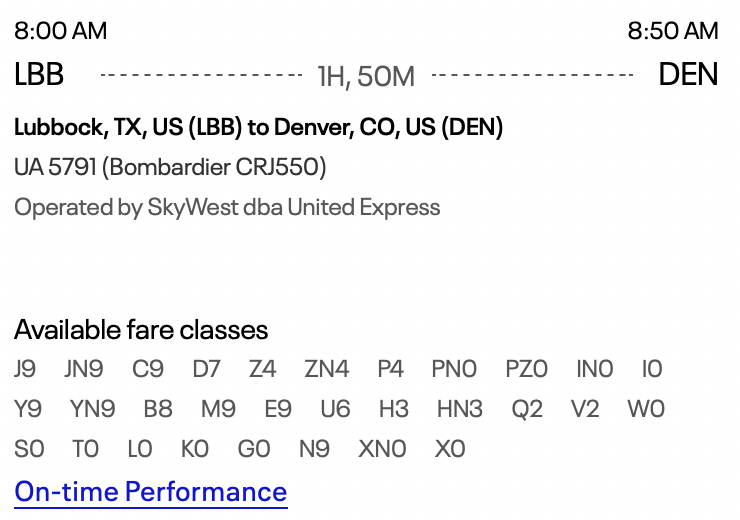
For this flight, there are (at least) 9 seats available in First, as seen by J9, the highest bucket in the First and Business group. The people of Lubbock don’t like to pay for first, I guess. The same flight has (at least) 9 seats available in Economy as seen by Y9, telling us that the Lubbock-ites don’t like to pay for economy either. (Side note: 9 is the maximum number that will display. So 9 really means “9 or more, idk I’m just a computer”)
So how do you turn Expert Mode on? Navigate to your Special accommodations settings under your profile and scroll to the bottom where you’ll find the setting “Enable expert mode”. Check that and click “Save”.
Using The Info
With the caveat that the number of seats for sale doesn’t always equal the number of seats available (ask Dr. Dao if you’re unsure why that is), looking at the number of seats available in the highest of each of the classes of fare buckets (first, economy, etc) to find the approximate number of seats available on the flight gives you actionable information. Once you get there, it’s time to “game theory and chill”.
Good luck friends!

Next up: Expert mode for banana hacking, how to see if your banana is simultaneously overripe and green.